Alto Enterprise 2025 Update 1 (17.1.0)
M.App Enterprise provides up-to-date release notes for our software. This article contains information about recent changes to the M.App Enterprise platform, including new and enhanced features, updates to existing features, and bug fixes.
We're pleased to announce the release of the new update version of our software, marking a significant milestone in its development. This version introduces a range of enhancements and new features. With improved performance and a more intuitive interface, the software is designed to offer a more seamless and efficient experience. We have worked diligently to incorporate the latest technologies and refine existing functionalities.
Download
The full install is available for download through the Hexagon Safety, Infrastructure & Geospatial Licensing Portal.
- Run
Alto Enterprise.exeon the Alto Enterprise server - Run the
Alto Enterprise Tile Services.exeon the Tile server
 Stefan Schüttenkopf
- (optional) Geoprocessing (
Alto Enterprise Geoprocessing 16.6.3.44.zip) - (optional) Alto Server for Alto Enterprise (
Alto Enterprise Server 17.1.0.exe) - (optional) For Linux based Alto Server installations (
Alto Enterprise Server 17.1.0 xCopy.zip)
 Stefan Schüttenkopf
 Markus Holler
Prerequisites
- Microsoft .NET 4.8 or higher
- IIS 8 or higher
Supported databases
- PostgreSQL 15 and later
- Microsoft SQL Server 2019 and later
- Oracle 21c and later
For all System requirements please have a look here:
 Stefan Schüttenkopf
New platforms
JAVA 24
This major version of Java is now also officially supported in Alto Enterprise. The integration process included a comprehensive test cycle that was successfully completed following the official release of Java 24 in mid-March 2025. As part of this update, Alto Enterprise users can benefit from enhanced performance, improved compatibility, and access to the latest Java features and security enhancements. The testing phase covered critical workflows and ensured stability and reliability across both the server and desktop environments. With this support, organizations can confidently deploy Alto Enterprise with Java 24, taking advantage of the latest advancements in the Java platform for their enterprise applications.
New technology
Desktop: Arrangement of buttons
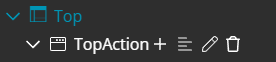
The MAE desktop layout has been updated in this release. Action buttons and workflow buttons are positioned closer together in the latest release, which may make the reload button less prominent than in previous versions. To address usability concerns and provide greater flexibility, administrators can now customize the arrangement of these buttons directly within the ActionSet definition. With this enhancement, administrators have the ability to restore the previous separation or increase the spacing between action and workflow buttons as needed. This option supports improved usability by helping users easily locate key functions and maintain the familiar, user-friendly Alto Enterprise experience. You can find a new icon inDesktop → ActionSets

Mobile: Two-factor authentication (2FA) for Alto Enterprise Mobile
This update introduces enhanced map control for Mobile Apps, allowing app maintainers to deliver customized map views and workflows tailored to specific user needs. Users on Windows devices can now easily switch between the 3D map view and the classic 2D view, ensuring a familiar navigation experience and a smoother workflow. Previously, the Windows map defaulted to 3D, causing frequent map rotation and repeated use of the compass reset. With this release, a 2D view option is available, providing a consistent user experience similar to Android devices. A new setting makes it possible to choose between 2D and 3D map dimensions in the Alto Browser component, giving administrators greater flexibility in how maps are presented to end users.Mobile: Support Google maps 2D tiles
Similar to the Alto Browser maps update, which allows users to switch between 2D and 3D map views for a more tailored and familiar navigation experience, app providers and maintainers now have greater control over the map view and its content within Mobile Apps. This enhancement enables the delivery of custom, targeted map views and workflows to end users, ensuring a more efficient and personalized user experience. In line with supporting 2D map views in Alto Browser, Mobile Apps now have the option to include Google Maps 2D Tiles as a background layer. This provides a consistent appearance for all users, regardless of their platform, and supports the familiar map types—roads, satellite, and hybrid. On Android devices, Google Maps 2D Tiles can be used as NativeLayer (types road, satellite, or hybrid). However, broader platform support is limited due to the token-based request process required by Google. The session token and API key must be obtained before requesting tiles, and using public URLs for tile requests may violate Google's Terms of Service. Enhanced security measures, such as restricting API services and usage quotas, are recommended for proper implementation.
Expanding Google Maps support for Mobile Apps, as previously done for Alto Enterprise Apps, would provide app maintainers with greater flexibility and security. Administrators can manage API access and quotas, ensuring compliance with Google's requirements while delivering uniform map experiences across platforms.
Mobile: Add maintenance options in Alto Enterprise Studio
We are introducing enhanced maintenance options in Studio Mobile to give Alto Enterprise tenant administrators greater control over Mobile deployments and help minimize the risk of data loss. With these new features, administrators can set a maintenance window for each app when configuration updates are planned. This helps ensure that end users’ data remains consistent, even during major updates. Here’s how the maintenance workflow will work:- Before the maintenance period begins, end users will receive notification messages at regular intervals, alerting them about the upcoming maintenance.
- During the maintenance window, the app will automatically switch to a read-only mode. This will apply even if users are offline or already in a session.
- All end users will be prompted to wipe their local data the next time they log in online.
- Users will see a notification confirming that maintenance has ended and the configuration has been updated. All steps in the workflow, except for the final notification, are optional and can be configured according to your organization’s needs. Administrators can also use configurable push messages to inform users about configuration changes.
Mobile: Group multiple layers
With this release, users can now group multiple layers together and control their visibility using a single switch button.
This enhancement streamlines workflow by allowing a group of layers to be displayed or hidden collectively, eliminating the need for individual visibility toggles for each layer.
The new group switch button provides a more efficient and user-friendly experience when managing layer visibility within the mobile application.
Mobile: Request layers inside groups
With this release, the layer management command in the mobile application has been improved. Layers can now be organized within groups, making it easier to display layers as on or off. This new structure allows users to activate or deactivate all layers within a selected group with a single click, streamlining workflow and increasing efficiency.
Mobile: Real button in Form
With this release, we are enhancing the mobile form experience by replacing the current icon-based action with a dedicated button. Previously, users interacted with an icon trigger form actions. Based on user feedback and usability research, a real button now be available, delivering clearer visual cues and a more intuitive interface.
Mobile: Add AllowSelection in PolygonVectorLayer
With this release, the AllowSelection property is now available in PolygonVectorLayer and other vector formats, aligning its functionality with the existing VectorLayer. This enhancement gives administrators and users the flexibility to specify whether entities on the map can be selected across all supported vector formats. As a result, you can now configure selection behavior consistently, improving control over map interactions and user experience.
Mobile: App dashboard
With this release, we are introducing a brand-new dashboard feature to the mobile app. The dashboard serves as a centralized entry point, allowing users to access all essential project information at a glance. Key metrics such as the total number of trees in the project, the number of inspections scheduled for the week, and the count of urgent cases are displayed prominently. Most figures are generated from summaries of existing lists or straightforward database counts, ensuring the dashboard reflects real-time project status. Additionally, users can tap on metrics like urgent cases to view a detailed list, streamlining navigation and improving operational efficiency.
Various bug fixes
Update Alto portfolio
As per every release the Alto portfolio also got updates in this Alto Enterprise 2025 update release
| Alto Server | 2025.0.18 |
|---|---|
| Alto Browser | 2025.0.12 |